






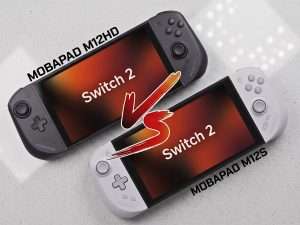
If you have been trying to compare the Mobapad M12 HD vs M12S Switch controllers, you have probably noticed the messaging has been a bit confusing. That is not you being thick. The short version is simple: both are ergonomic Switch 2 split controllers built around the same core shell, TMR sticks, rear buttons, Bluetooth support, and 800mAh batteries. The actual difference is in protocol behaviour, rumble type, gyro implementation, button layout, and charging quirks.
Contents
The blunt answer
- Buy the M12 HD if you care more about HD Rumble, NFC/Amiibo support, and the M-button for remapping, turbo, and macros.
- Buy the M12S if you care more about Switch 2-native style features, including the C-button for voice chat and 9-axis motion control.
- The M12 HD is the one with more caveats, especially around charging behaviour and gyro behaviour in certain games.
Mobapad M12 HD vs M12S: specs that actually matter
- Both models: TMR Glide Sticks, ergonomic split design, interchangeable D-pad options, macro/remapping support, Bluetooth wireless mode, rail connection in handheld mode, 800mAh battery, quoted 15 to 20 hours of playtime, and laser-lit logos with adjustable brightness/effects. The attached size is listed as approximately 306.87mm × 116.20mm × 46.93mm.
- M12 HD: HD Rumble, NFC support, M-button, 6-axis gyro, around 92.5g per side, and a power-saver mode that can reduce draw from the console and extend handheld battery life by up to roughly 30 minutes.
- M12S: standard vibration instead of HD Rumble, 9-axis motion control, and a C-button for in-game voice chat features instead of the M-button.
Side-by-Side Comparison

1. The biggest real-world difference: M-button vs C-button
This is the easiest distinction to understand. The M12 HD has an M-button, which Mobapad says handles Turbo, button remapping, and macro programming. The M12S swaps that for a C-button, intended for voice chat functionality.
In plain English: if you play single-player games, action titles, emulation setups, or anything where remapping and quick profile behaviour matter, the M12 HD is the more enthusiast-friendly option. If you actually use Switch 2 social features or want the layout to feel more aligned with newer platform features, the M12S makes more sense.
2. HD Rumble vs standard rumble
The M12 HD includes HD Rumble, while the M12S uses standard vibration. That is not marketing garnish; it changes how subtle feedback feels in games that use nuanced haptics well. Mobapad explicitly positions the HD as the more immersive model for that reason.
If you barely notice rumble, do not pay extra for it. If you are picky about haptics in Zelda, racing games, or anything that uses texture and impact feedback properly, HD Rumble is one of the few premium features here that is genuinely tangible.
3. Gyro is not just a number on a spec sheet
The M12 HD uses 6-axis gyro. The M12S uses 9-axis motion control. On paper, that makes the M12S look plainly superior, and for some buyers it probably is.
But the more important issue is not 6-axis versus 9-axis in isolation. It is how the console and games interpret the controller mode. Mobapad states that the M12 HD adopts the Switch 1 protocol, and because of that it is not recognised as handheld mode at the system level. Mobapad also says some games switch gyro logic depending on the console’s operating mode, which can cause abnormal gyro performance on the M12 HD until adjusted through app updates or custom settings.
This is where Reddit has actually been useful. User reports repeatedly flag that gyro behaviour can differ noticeably between M12 HD and M12S in certain games, especially where handheld and detached controller logic are treated differently. That is anecdotal, not lab-grade testing, but it aligns with Mobapad’s own protocol explanation.
4. Charging is where the M12 HD gets awkward
This is the bit most comparison posts bury, and it matters more than the rumble debate. The M12 HD supports three charging methods: handheld mode while the console is supplying power, TV mode while docked and active, and via a dedicated charging grip. Mobapad also says the power-saver switch cuts off or restores power supply from the Switch 2.
So if you want the cleanest, least-fussy ownership experience, the M12S likely has the safer profile. If you are happy to manage charging more deliberately, the M12 HD’s feature set may still be worth it. Ultimately, playing while plugged in to charge may not be an issue for you. When you buy the M12HD from GameSwap, you also get the charging grip included at no extra cost.
5. Connectivity: more similar than different
Mobapad says both the M12 HD and M12S use a physical connection for wired handheld use and Bluetooth in wireless mode. In other words, the basic connection architecture is the same. The company’s FAQ also claims both offer the same seamless Switch 2 rail and Bluetooth connectivity.
That said, community posts indicate the user experience is not identical. Mobapad’s own Reddit account has stated there is no significant difference in wired connection experience, while also confirming the HD does not support C-button features.
The practical takeaway: do not choose between them based on wired latency fantasies. Choose based on feature trade-offs.
6. Shared hardware: the stuff you get either way
There is a lot both models share, and this is why the comparison gets overcomplicated. Whichever one you buy, you are getting the bits that actually improve handheld comfort over stock Joy-Con style controllers:
- TMR Glide Sticks with 4096-level precision claims and anti-drift positioning from Mobapad’s marketing material.
- Improved ergonomics designed for the wider Switch 2 layout rather than just enlarging the old shell.
- 800mAh batteries with quoted 15 to 20 hours of playtime.
- Interchangeable D-pad options and rear-button customisation support.
So no, this is not a good-versus-bad product split. It is two variants of the same controller concept with different compromises.
Which one should you actually buy?
You should buy the Mobapad M12 HD if:
- You want HD Rumble.
- You want NFC/Amiibo support.
- You care about on-device macro, turbo, and remapping access via the M-button.
- You mainly play games where the charging and gyro caveats will not annoy you.
You should buy the Mobapad M12S if:
- You want the cleaner Switch 2-style feature set.
- You want the C-button for voice features.
- You prefer 9-axis motion control.
- You want to avoid the more obvious M12 HD charging and protocol weirdness.
Our honest verdict on Mobapad M12HD vs M12S
If you strip away the forum noise, the answer is this: the M12 HD is the more feature-rich enthusiast model, while the M12S is the more native-feeling practical model. The HD wins on haptics, NFC, and custom-control flexibility. The S wins on cleaner Switch 2 integration logic and motion-control confidence.
For most buyers, the smart question is not “which one has more features?” but “which set of compromises will bother me less after three months?” If charging quirks and game-specific gyro behaviour sound irritating, do not pretend you will be fine with them. Get the M12S. If you are the sort of player who actually uses remaps, macros, Amiibo, and better haptics, the M12 HD is still the more interesting bit of kit.
And yes, if you are buying one from GameSwap, the boring practical stuff matters too: next day UK delivery, authorised retailer, local support, and tax-inclusive pricing for international customers. That is not lifestyle branding. It just means if information around these joycons has been confusing, at least the buying part does not need to.
 English
 German
 Italian